--:-- --
Automatically classify, label, and respond to every email as it arrives.
What It Does
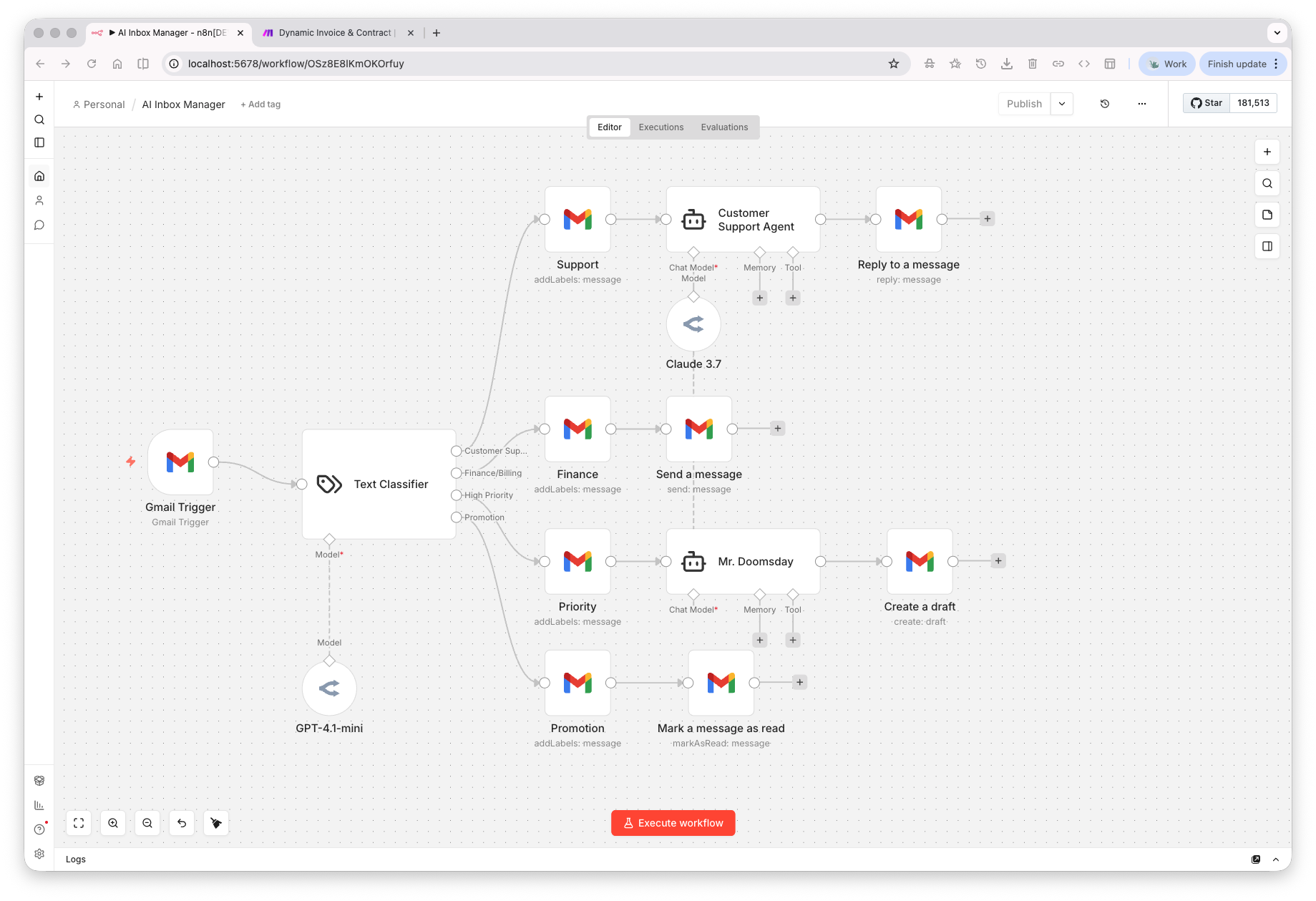
When a new email lands in Gmail, an AI classifier reads the subject and body and routes it into one of four categories — customer support, finance and billing, high priority, or promotional. Each path triggers a different automated action: customer support emails get an AI-drafted reply sent instantly, billing emails notify the right team with a structured summary, high priority emails generate a draft for human review, and promotional emails are labeled and marked unread automatically.
The Problem It Solves
Inbox management is one of the biggest hidden time drains in any business — reading, sorting, triaging, and responding to emails manually consumes hours that compound daily. Letting things slip through or responding slowly to high-priority emails costs deals and damages relationships.
Before & After
Before
After
Tools Used
 n8n
n8n
 Gmail
Gmail
 OpenAI
 Claude
WORK WITH ME
Want this built for your business?
Book a free strategy call — I'll map out exactly how this would work for your workflow. No pitch, no pressure.
📞 Book a Free Strategy Call ↗