--:-- --
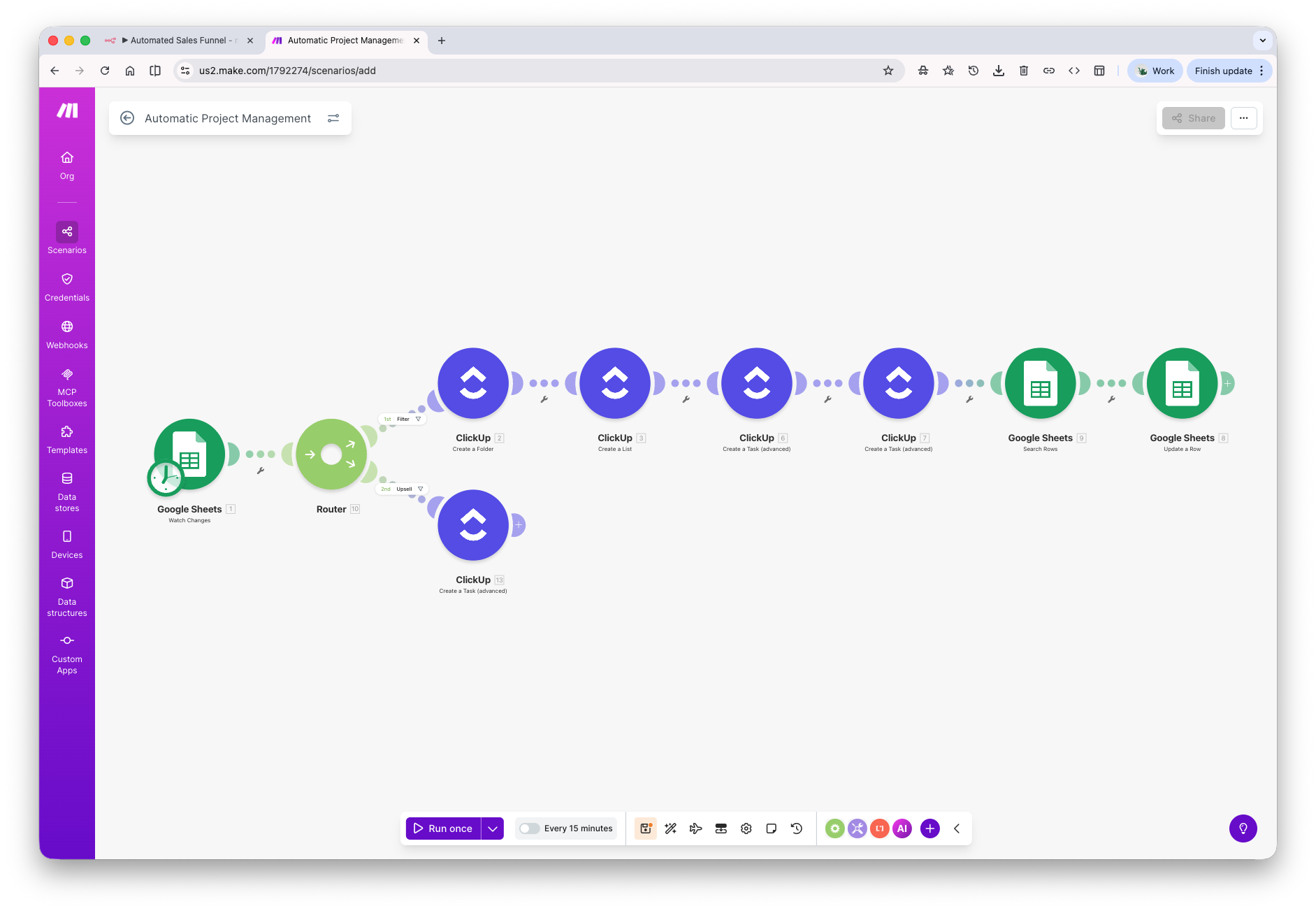
Instantly build a full client project in ClickUp the moment someone signs.
What It Does
When a lead is marked as a client in your CRM or Google Sheet, this automation creates a complete ClickUp project folder with a task list and pre-built tasks — each assigned to the right team member, tagged, and due-dated relative to the project timeline. A second trigger watches for upsells or scope changes and adds new tasks to the existing project automatically, keeping everything in sync without manual input.
The Problem It Solves
Creating project management files manually after every new client is repetitive, inconsistent, and easy to forget — especially when you're onboarding multiple clients at once. Tasks get missed, due dates aren't set, and nothing gets assigned until someone chases it down.
Before & After
Before
After
Tools Used
 Make.com
 Google Sheets
 ClickUp
WORK WITH ME
Want this built for your business?
Book a free strategy call — I'll map out exactly how this would work for your workflow. No pitch, no pressure.
📞 Book a Free Strategy Call ↗